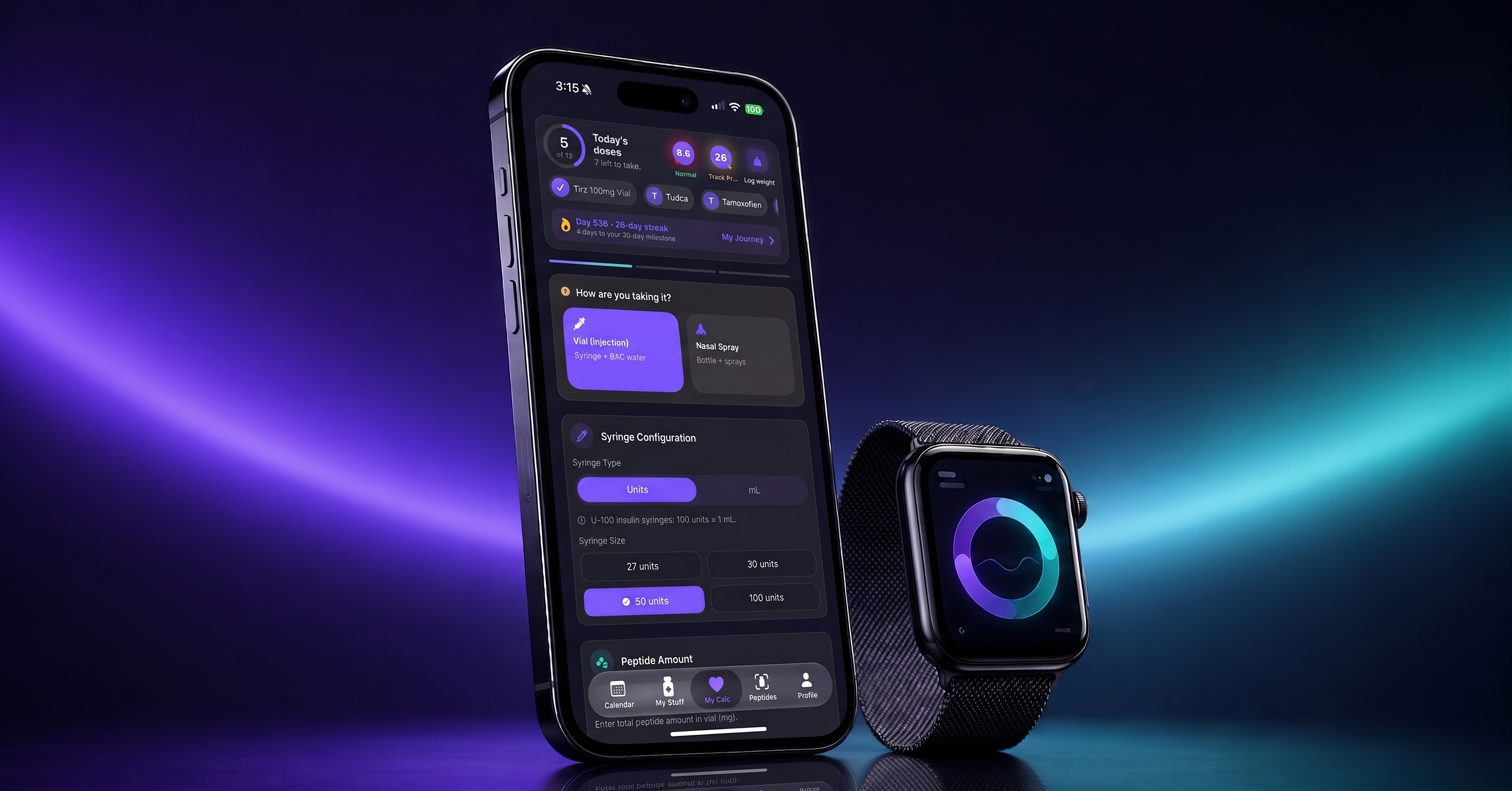
The free peptide calculator app for iOS rebuilds vials, meals, labs and workouts, puts its reconstitution calculator front and center, adds lab email reminders.
WASHINGTON, DC, UNITED STATES, September 16, 2026 /EINPresswire.com/ — Peptides Calculator, the free peptide tracking app built for the research community, today released version 9.1.2 of its iOS app — the largest redesign in the product’s history. The update rebuilds six core screens — the vials list, vial detail, supplements, meals, workouts and the calendar — adds in-app lab appointment booking with email reminders, introduces set-by-set workout logging, gives meal-plan generation multi-week control with live progress, and moves the app’s namesake planning tool, the peptide calculator, back to the center of the experience. The app now opens directly to it, the way more than 50,000 researchers first found the product.
Where previous releases added capabilities, 9.1.2 is about how the app reads. Every rebuilt screen follows the same design principle: one clear next action, presented in the order a researcher’s day actually happens. A plan is set; then progress is logged against it. A meal is eaten; then it is recorded and the day’s line moves forward. A training set is finished; then a marker fills. The interface is built to be read at a glance and advanced with a single tap.
“We redesigned the whole app around one idea — it should read like your day, not a database,” said Himanshu Batra, founder of Peptides Calculator. “Everything a researcher tracks now lives on a timeline, one clear next step at a time. The calculator that started it all is back at the center, and vials, meals, labs and workouts are all rebuilt around the researcher’s actual day rather than around a menu of features.”
THE PLANNING TOOL, BACK AT THE CENTER
The redesign begins with the tab bar. The calculator — the planning tool the app is named for — now occupies the center tab, and the app opens straight to it. For a community that still fills search engines with terms like “peptide calculator” and “free peptide calculator app,” the decision is deliberate: the calculator is the front door, not a feature buried three taps deep.
The calculator turns the numbers a research protocol involves into an organized, tracked plan. A researcher enters the figures for a given item and the app keeps the resulting plan consistent, converts cleanly between the units a protocol is described in, and carries those figures forward into tracking so nothing has to be re-derived by hand later. The redesigned wizard is now headerless and immediate — no branding banner, no preamble, just the numbers. From the result, a researcher can turn a plan into a tracked item in one motion: the calculator is the only place a tracked item is created in the app, which means every item carries correct, consistent figures from day one. A cycle-estimate section answers the natural follow-on question — how much a plan needs across its full duration — before anything is ordered.
A VIALS LIST THAT READS LIKE INVENTORY
Every card on the redesigned vials list now carries a colored supply rail — a vertical gauge showing how much of the item remains. The rail runs in the researcher’s accent color while supply is healthy, shifts to amber when it runs low, and to rose when it is time to reorder. For researchers tracking several items in parallel — the norm, not the exception, in this community — the list now reads like inventory: one glance answers which items are healthy, which are running down and which need attention this week.
A quick-action row sits directly on the list, so today’s entry can be logged, skipped or undone without opening the item. The detail screen underneath was rebuilt in kind: the plan’s key figures always visible, cycle status, stock on hand, and the item’s complete history on the same screen with add, edit and delete for every entry. The change turns the app from a tracker that merely stores history into one that organizes a researcher’s full working record.
LOGGING BUILT INTO EVERY SCREEN
Logging is now one tap from wherever a researcher already is — the item screen, the vials list or the calendar — and it opens a single, consistent sheet where the date and any notes sit at the top. Recording the optional detail earns a small bonus in the app’s progression system, but it is never a gate: an entry can be logged immediately and enriched later, because a recorded entry with less detail is better data than one that never gets logged. Undo now works from every screen, and history stays in sync everywhere — an entry made on the calendar appears on the item, and one removed on the item disappears from the calendar.
Schedules support the community’s full range of habits: fixed weekly days, alternating biweekly patterns and interval schedules, each with its own times and notification preferences — delivered as push notifications or, for researchers who prefer it, as calendar events. Consistency is rewarded: daily streaks, weekly challenges, achievements and an XP progression system turn follow-through into a visible record rather than a vague intention.
MEALS BECOME A DAY, NOT A LIST
The new meal screen is a day-first diary the team calls the Dayline: a continuous line that inks through the day as each meal is logged, with suggestions rendered in gold and a single clear call to action at any moment. Instead of presenting a week of hypothetical meals, the screen presents today — what has been eaten, what is next and how the day is tracking against calorie and macro targets.
Plan generation was rebuilt around researcher control. When generating a meal plan, the researcher now chooses how many weeks to generate — one through four — and watches each week build with live progress. Generation runs one week at a time, can be cancelled mid-run and keeps every completed week: a researcher who asks for four weeks and cancels after two keeps two full weeks of dated, varied meals. Each week is generated with variety constraints so week three does not quietly repeat week one.
LABS ON THE CALENDAR, REMINDERS IN THE INBOX
Version 9.1.2 adds lab appointment booking to the app’s lab suite. A researcher books their next blood panel in-app and can opt in to an email reminder ahead of the appointment — a nudge timed so a fasting panel is not ruined by a forgotten date. Standing lab reminders — the recurring “time for your quarterly panel” cadence — now live on the same unified screen, so the full lab rhythm is visible in one place.
The booking feature joins an established lab workflow: the app already reads lab panel results by scan, tracks more than forty markers across hormones, metabolic health, lipids, inflammation, liver, kidney, thyroid and blood-count categories, charts marker trends across draws, and generates AI comparison insights that flag which markers moved between panels. With 9.1.2, the loop closes — the app that organizes the panel now also helps the researcher show up for it.
SET TRACK: WORKOUTS LOGGED THE WAY THEY HAPPEN
The exercise screen was rebuilt as Set Track. Each exercise carries a load rail showing the working weight, set markers that fill as sets are completed and a week ribbon that keeps the training rhythm visible. Logging happens set by set, in the gym, between sets — not as an all-or-nothing checkbox at the end of a workout. Partial work counts: three sets logged honestly beat a workout abandoned in the app because the last set never happened.
SUPPLEMENTS, A JOURNEY HOME, AND A CALENDAR THAT KEEPS UP
The supplements list receives the same supply-rail design as vials, with an adherence strip showing consistency over time, and finished supplements can now be archived instead of deleted — preserving their history without cluttering the active list. A new My Journey screen becomes the researcher’s progress home, with rotating highlight tiles above deep statistics: streaks, adherence, weight trends and wellness scores in one place. The redesigned calendar presents the week as a clean timeline with day-off support, fully in sync with the items it reflects.
A BUILT-IN PEPTIDE ENCYCLOPEDIA AND FREE TOOLS
Alongside the calculator, the app ships a searchable peptide encyclopedia of more than one hundred profiles, each with category, typical half-life and general reference notes drawn from public descriptions — reference material only, not guidance. The company also maintains free, no-signup web tools at peptidescalculator.app for researchers who are not yet in the app, including a peptide half life reference chart that plots how long various profiles remain measurable, answering that common question visually rather than with a formula. The web tools mirror the app’s own figures, so a number seen in a browser matches the number the app keeps — and they run in any browser, on desktop or phone, free, with no account required.
FREE FOR EVERY RESEARCHER
The core of Peptides Calculator remains free: the calculator, vial and item tracking, logging, the peptide encyclopedia, supplements, the calendar and the redesigned meal and workout surfaces are all available to every user at no cost. A Pro subscription adds unlimited tracked items, advanced scheduling, lab scan tracking and the AI-assisted features whose per-use costs are real. The app is fully localized in English and Spanish, and researchers comparing options for the best peptide calculator app can judge the redesign directly — the calculator is the first screen they will see.
9.1.2 BY THE NUMBERS
Six core screens rebuilt in a single release. More than one hundred profiles in the built-in peptide encyclopedia. More than forty lab markers tracked across eight categories. Up to four weeks of meals generated in one run, each with live progress. Two languages, English and Spanish, across the entire app. One tap from launch to the calculator — because the app now opens on it.
AVAILABILITY
Peptides Calculator 9.1.2 is available worldwide on the App Store for iOS 17 and watchOS 10 and above, in English and Spanish. Existing data — vials, supplements, logs, lab results, streaks and plans — carries forward unchanged. The Apple Watch companion continues to surface reminders, current streaks, water intake, weight history and HealthKit workout and heart-rate data on the wrist.
ABOUT PEPTIDES CALCULATOR
Peptides Calculator is an iOS and Apple Watch application built for the peptide research community. The app provides planning and math utilities, cycle and inventory tracking, lab panel organization with AI-assisted insights, personalized meal and exercise plan generation, and local-first data storage — a researcher’s data lives on their device and in their own iCloud, not in a vendor cloud database. Learn more at peptidescalculator.app.
Peptides Calculator provides descriptive tracking tools and general math utilities only. It does not offer medical advice, does not provide administration or preparation instructions, does not recommend or endorse any compound, and is not a substitute for consultation with a licensed healthcare professional. Information in the app’s encyclopedia is general reference material compiled from public sources.
Himanshu Batra
Sphnix, Inc
+1 571-217-0000
email us here
Legal Disclaimer:
EIN Presswire provides this news content “as is” without warranty of any kind. We do not accept any responsibility or liability
for the accuracy, content, images, videos, licenses, completeness, legality, or reliability of the information contained in this
article. If you have any complaints or copyright issues related to this article, kindly contact the author above.

Media gallery